


Download Ten Thumbs Typing Tutor – learn touch typing, improve typing speed, typing tutor software, keyboard training, touch typing practice, typing skills improvement, language learning, typing practice for kids, typing for adults, typing for students, typing for professionals, touch typing for beginners
Overview
Ten Thumbs Typing Tutor is a productivity-focused software designed to help users of all ages master touch typing through structured, engaging, and adaptive learning methods. The app addresses the foundational need for efficient keyboard navigation in both personal and professional digital environments. Whether you're a student aiming to improve academic writing speed, a professional seeking to enhance workplace efficiency, or a parent introducing typing to a child, this tool offers a comprehensive approach to keyboard training. Its core purpose lies in transforming users from hunt-and-peck typists into fluent touch typists by cultivating muscle memory and proper finger placement.
The software supports multiple languages including English, French, German, Spanish, Dutch, and Italian, allowing users across various linguistic regions to learn in their native language. This feature enhances comprehension and accelerates skill acquisition. Real-world language generation ensures that lessons remain relevant and non-repetitive, simulating authentic typing scenarios.
For educators and institutions, the inclusion of printable progress reports adds value in classroom settings, enabling performance tracking and feedback. Although the developer did not provide additional technical details, the app’s release on Mac suggests a focus on desktop users seeking a dedicated typing training experience. The software fills a niche in the digital productivity ecosystem by offering a structured, long-term learning path for a skill that remains critical in modern communication.
Key Features & Functionality
- Comprehensive Language and Keyboard Support – Users can select from six major European languages, each with corresponding keyboard layouts. This ensures accurate key positioning and linguistic relevance, which is particularly beneficial for multilingual learners and non-native English speakers.
- Adaptive Lessons – The software analyzes user performance in real time and identifies frequently missed or incorrectly typed keys. It then generates targeted practice sessions for those specific keys, accelerating improvement in weak areas without unnecessary repetition.
- Real-World Language Generator – Instead of using artificial or repetitive phrases, the app dynamically generates sentences and paragraphs based on natural language patterns. This fosters better contextual understanding and prepares users for actual typing tasks such as emails, essays, and reports.
- SongSeeker™ Integration – By syncing with Apple’s iTunes, users can type along to music they enjoy. This gamified approach increases motivation and makes practice sessions more enjoyable, especially for younger learners or those who find traditional drills monotonous.
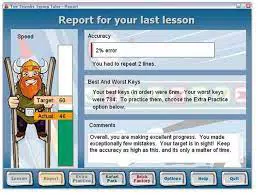
- Progress Tracking and Reporting – Version 4.7 introduced the ability to generate and print detailed performance reports after each lesson. These reports include metrics such as accuracy, words per minute, and error patterns, offering users a clear view of their development over time.
For example, a student preparing for exams might use the real-world language generator to practice writing summaries in French, while a professional could focus on improving speed and accuracy in English business correspondence. Teachers can leverage the reporting feature to monitor class-wide progress and tailor instruction accordingly.
Interface, UX & Performance
The interface of Ten Thumbs Typing Tutor is designed with usability in mind, featuring a clean layout that minimizes visual clutter. Navigation is straightforward, with clearly labeled sections for lessons, progress tracking, and settings. The visual style emphasizes functionality over ornamentation, allowing users to focus on the typing exercises without distraction. The app’s responsiveness is consistent across Mac devices, though specific performance metrics were not disclosed by the developer.
Users can easily switch between language settings, access adaptive drills, and review their progress through intuitive menus. The learning flow follows a logical progression from basic key placement to full-paragraph typing, supporting both beginners and intermediate users. Although the developer did not list formal performance metrics, the app appears stable during extended sessions, with no reported crashes or freezes in the available documentation.
The interface remains responsive even when generating dynamic content, suggesting efficient resource management. For users with limited screen space, the compact design ensures that essential tools remain accessible without overwhelming the workspace. Overall, the UX prioritizes clarity and consistency, making it suitable for both children and adults with varying levels of technical familiarity.
Platform Compatibility & Technical Requirements
Ten Thumbs Typing Tutor is available exclusively for macOS, indicating a targeted release for Apple desktop users. The app requires a Mac device running the latest compatible version of the operating system, though specific OS requirements were not listed. The file size is 13.4 MB, which is relatively lightweight for a productivity application with interactive content and adaptive features.
Users should ensure their Mac meets the necessary hardware standards for smooth operation, though the developer did not provide detailed system specifications. Compatibility with older Mac models was not confirmed. The app is distributed as a native Mac application, which suggests optimized performance and seamless integration with macOS features such as Spotlight, clipboard, and system notifications. The absence of mobile or cross-platform availability means that users must rely on a Mac to access the full suite of tools.
Pros and Cons
Pros
- Supports multiple languages with accurate keyboard layouts
- Adaptive lessons target individual weaknesses for faster improvement
- Real-world language generation prevents repetitive drills
- Music integration via SongSeeker™ enhances engagement
- Printable progress reports aid in tracking development
- Lightweight file size at 13.4 MB
Cons
- Available only on macOS, limiting access for Windows or mobile users
- Price point of $29.99 may be high for casual learners
- No information on system requirements or compatibility with older Macs
- Mobile or web version not available
- Developer did not provide updates or release notes beyond version 4.7
FAQ
Is Ten Thumbs Typing Tutor available for iOS or Android?
The app is currently available only for macOS. There is no mobile or web version reported.
Can I use this app if I'm not a native English speaker?
Yes, the software supports multiple languages including French, German, Spanish, Dutch, and Italian, allowing non-native speakers to learn touch typing in their preferred language.
How does the adaptive lesson feature work?
The app monitors your typing accuracy and identifies keys you struggle with. It then generates additional practice sessions focused specifically on those keys to improve your skills efficiently.
Is the progress tracking feature useful for teachers?
Yes, version 4.7 includes printable reports that can be used by educators to monitor student performance and assess typing skill development over time.
Can I use the app without connecting to iTunes?
Yes, the SongSeeker™ feature requires iTunes for music integration, but all core typing lessons and features are fully functional without it.
Final Thoughts
Ten Thumbs Typing Tutor stands out as a focused, effective tool for anyone serious about mastering touch typing. Its adaptive learning engine, multilingual support, and engaging features like SongSeeker™ make it a compelling choice for students, professionals, and lifelong learners. The ability to generate real-world content and track progress through printable reports adds significant value, especially in educational settings. While the $29.99 price tag and Mac-only availability may limit accessibility, the app delivers tangible benefits for users committed to long-term skill development. For those seeking a structured, enjoyable, and results-driven typing experience, this software offers a well-rounded solution.
Download Ten Thumbs Typing Tutor now


